𝗙𝗿𝗼𝗺 𝗮𝗿𝗰𝗵𝗶𝘁𝗲𝗰𝘁𝘂𝗿𝗲 𝘁𝗼 𝗱𝗲𝗽𝗹𝗼𝘆𝗺𝗲𝗻𝘁: 𝗥𝘂𝗻𝗻𝗶𝗻𝗴 𝗼𝘂𝗿 𝘀𝘆𝘀𝘁𝗲𝗺 𝗼𝗻 𝗞𝘂𝗯𝗲𝗿𝗻𝗲𝘁𝗲𝘀
After designing the microservice architecture for our project 𝗩𝗮𝗹𝗲𝗿𝗶𝘅, next step was taking it beyond local development and deploying it in cloud.
Read previous post on the Microservice Architecture of Valerix: Link
To do this, we containerized each service and deployed the system on Amazon Web Services (AWS) using 𝗞𝘂𝗯𝗲𝗿𝗻𝗲𝘁𝗲𝘀 (𝗘𝗞𝗦), allowing us to simulate a small production style environment for our distributed system.
GitHub Link: https://github.com/rawadhossain/Valerix
The deployed system followed this flow:
𝗖𝗹𝗶𝗲𝗻𝘁 → 𝗜𝗻𝗴𝗿𝗲𝘀𝘀 (𝗡𝗚𝗜𝗡𝗫) → 𝗙𝗿𝗼𝗻𝘁𝗲𝗻𝗱 → 𝗔𝗣𝗜 𝗚𝗮𝘁𝗲𝘄𝗮𝘆 → 𝗕𝗮𝗰𝗸𝗲𝗻𝗱 𝗦𝗲𝗿𝘃𝗶𝗰𝗲𝘀
Container Orchestrated View
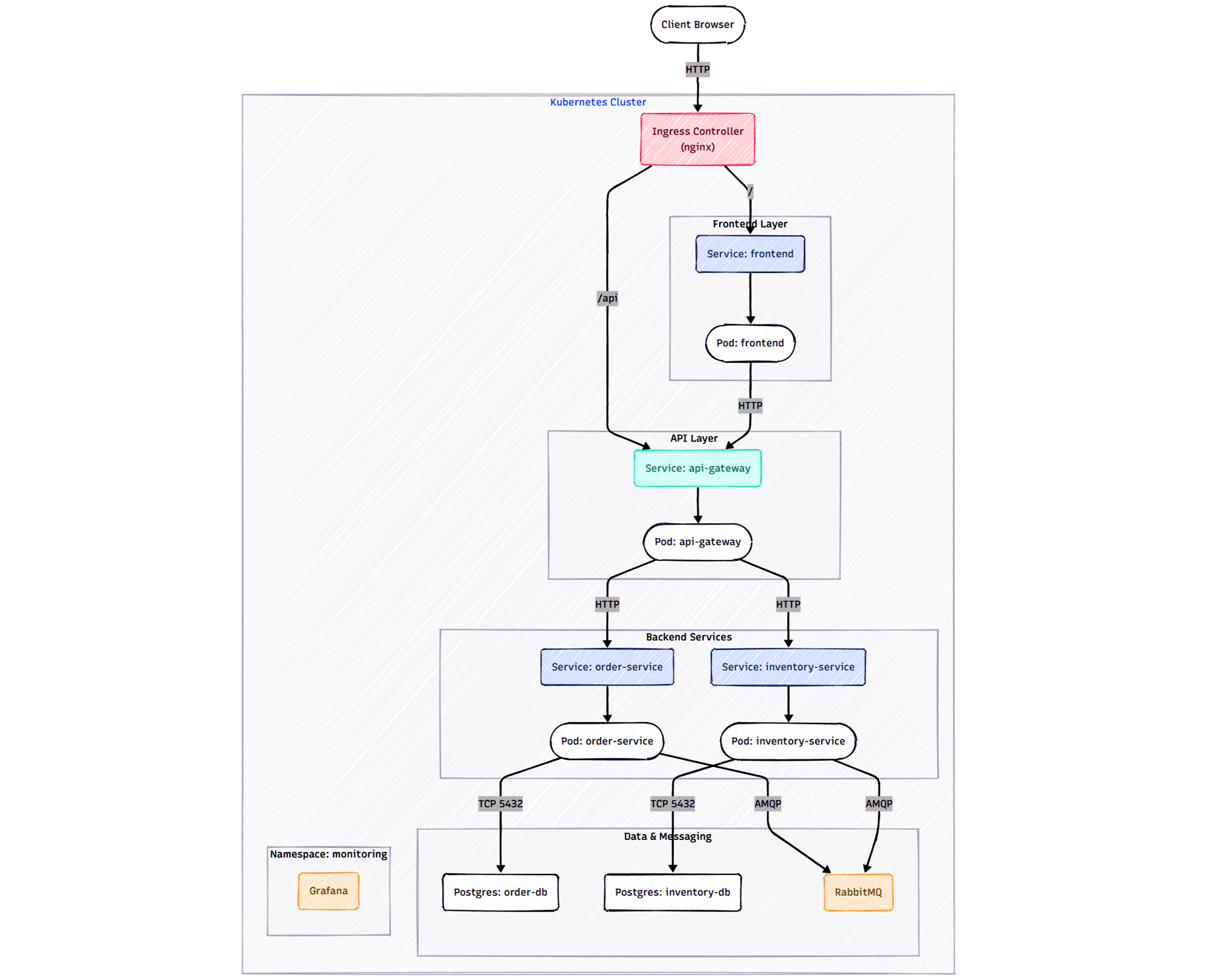
Each component ran as independent containers orchestrated inside a 𝗞𝘂𝗯𝗲𝗿𝗻𝗲𝘁𝗲𝘀 𝗰𝗹𝘂𝘀𝘁𝗲𝗿 on 𝗔𝗪𝗦 𝗘𝗞𝗦.
To deploy the system, we used:
• 𝗗𝗼𝗰𝗸𝗲𝗿 to containerize each service
• 𝗔𝗪𝗦 𝗘𝗖𝗥 to store and manage container images
• 𝗔𝗪𝗦 𝗘𝗞𝗦 to run the Kubernetes cluster
• 𝗲𝗸𝘀𝗰𝘁𝗹 to provision and configure the cluster
• 𝗸𝘂𝗯𝗲𝗰𝘁𝗹 to manage deployments, services, and cluster resources
• 𝗔𝗪𝗦 𝗜𝗔𝗠 𝗿𝗼𝗹𝗲𝘀 to securely allow cluster and registry access
Each microservice was deployed using 𝗞𝘂𝗯𝗲𝗿𝗻𝗲𝘁𝗲𝘀 𝗗𝗲𝗽𝗹𝗼𝘆𝗺𝗲𝗻𝘁𝘀 𝗮𝗻𝗱 𝗦𝗲𝗿𝘃𝗶𝗰𝗲𝘀, allowing the system to scale and operate as independent components inside the cluster.
Core services included:
• frontend-service
• api-gateway
• order-service
• inventory-service
Traffic from users was routed through 𝗡𝗚𝗜𝗡𝗫 𝗜𝗻𝗴𝗿𝗲𝘀𝘀 𝗖𝗼𝗻𝘁𝗿𝗼𝗹𝗹𝗲𝗿, which directed requests to the appropriate services within the cluster.
The backend services were connected to their supporting infrastructure:
• 𝗥𝗮𝗯𝗯𝗶𝘁𝗠𝗤 for asynchronous communication between services
• 𝗣𝗼𝘀𝘁𝗴𝗿𝗲𝗦𝗤𝗟 𝗱𝗮𝘁𝗮𝗯𝗮𝘀𝗲𝘀 for Order and Inventory data
• 𝗣𝗿𝗼𝗺𝗲𝘁𝗵𝗲𝘂𝘀 & 𝗚𝗿𝗮𝗳𝗮𝗻𝗮 for monitoring and observability
All infrastructure components were defined using Kubernetes manifests, making the system easy to deploy, manage, and reproduce inside the cluster.
Moving from 𝗗𝗼𝗰𝗸𝗲𝗿 𝗖𝗼𝗺𝗽𝗼𝘀𝗲 𝗹𝗼𝗰𝗮𝗹𝗹𝘆 to a fully 𝗼𝗿𝗰𝗵𝗲𝘀𝘁𝗿𝗮𝘁𝗲𝗱 𝗞𝘂𝗯𝗲𝗿𝗻𝗲𝘁𝗲𝘀 𝗲𝗻𝘃𝗶𝗿𝗼𝗻𝗺𝗲𝗻𝘁 on 𝗔𝗪𝗦 was a great experience. Seeing the system run end to end on AWS with services communicating, routing, and running inside the cluster was one of the most rewarding parts of the project.


